Showing posts with label vector. Show all posts

Sunday, January 12, 2014

Akasa Branding Web Design/Dev

1. I took a photo of a small branch and edited the ends of the branch to make a nice pattern.


2. Then I placed the branch to Illustrator CC and dragged it in the brushes area. 


3. I applied the brush pattern to the stroke I made.


Final Artwork:


Wednesday, August 28, 2013

Stars and Vitamins 'nicole blanche dias'

Nicole was my seatmate back in college. Every time I see her she kept asking me about her favourite band Black Sabbath. Then the last time she asked me about Black Sabbath I told her "Why do you keep asking me the same question?" And the she laughed. 


Sunday, December 23, 2012

Pathfinder- How to use the Pathfinder in Illustrator

Welcome to Pathfinder :)


1. Unite
2. Minus Front
3. Intersect
4. Exclude
5. Divide
6. Trim
7. Crop
8. Merge
9. Outline

1. Unite
Combines two shapes

2. Minus Front
Takes out the shape from the front shape

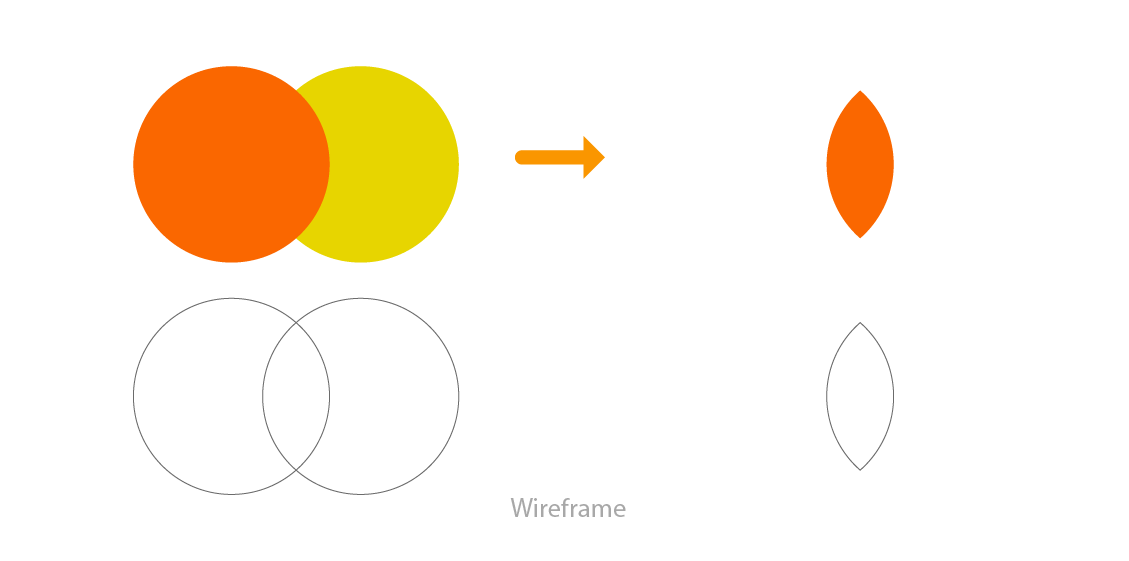
3. Intersect
Only intersecting area will remain


4. Exclude
Intersecting area will be removed

5. Divide
Divides all shape and creates individuals shapes (This is used in color separation)

6. Trim
Bottom shape is subtracted from front shape

7. Crop
Leaves front shape and divides the intersecting area


8. Merge
Seperates all colors and unites same colors

9. Outline
Turnes vector to strokes

10. Minus Back
Subtracts everything from back to the front shape